Saturday, 27 December 2014

Do you name your turkey at Christmas and if so, what?

Until I was invited to spend Christmas with my wife and her family in 2004 I have never experienced the tradition of naming the turkey. My family had never done this so it was a bit peculiar to me.

For those of you with no experience of this, it's basically a case of naming the turkey after someone who has behaved like a turkey during that year. The person chosen could be anyone such as a sports-person, a celebrity or a politician. The choice is yours but you must all agree and agree before the turkey goes in the oven.

This year (2014) we eventually decided on Andrew (or Pleb) after Andrew Mitchell and 'Plebgate' went terribly wrong for him during the legal trial.

There were some other options on the table, including:
  • Oscar, after Oscar Pistorius, who infamously shot dead his girlfriend Reeva Steenkamp in Febriary 2013 and was convicted of culpable homicide in 2014. We couldn't do this in the end as we decided no one would be able to find a leg (!)
  • Rolf, after Rolf Harris, who was found guilty of 12 counts of indecent assault on 4th July 2014 for historical sex abuses. However, we decided that it was impossible to have such a sicko at the Christmas table
Did you name your turkey this year? If so, who did you name it after. Let me have your comments below or Tweet me @BluesF1Brother

Saturday, 20 October 2012

How to make Nortel VPN faster use the local network connection and not the secure tunnel

A few years ago, I posted a question for some advice on how to make the Nortel VPN client allow the user to use their local internet connection, and not the (very slow) remote secure tunnel. The reason for this was because I have a 100mb connection at home and because my office only uses 4mb I was restricted to that speed. It made my entire remote user experience very slow and very frustrating.

Unfortunately, in the UK, BT don't give very good support on the IP Softphone and Remote Worker software and neither do Nortel. So I was left to my own devices to find a solution.

I have searched high and low and couldn't find any help so decided to play around with the settings on the Business Secure Router (BSR) which is the "gateway" from my home network to the office. Once connected to my office, the IP address for this was 192.168.0.91 (you might find yours elsewhere). The default username was nnadmin and the password was PlsChgMe! - including the ! mark.

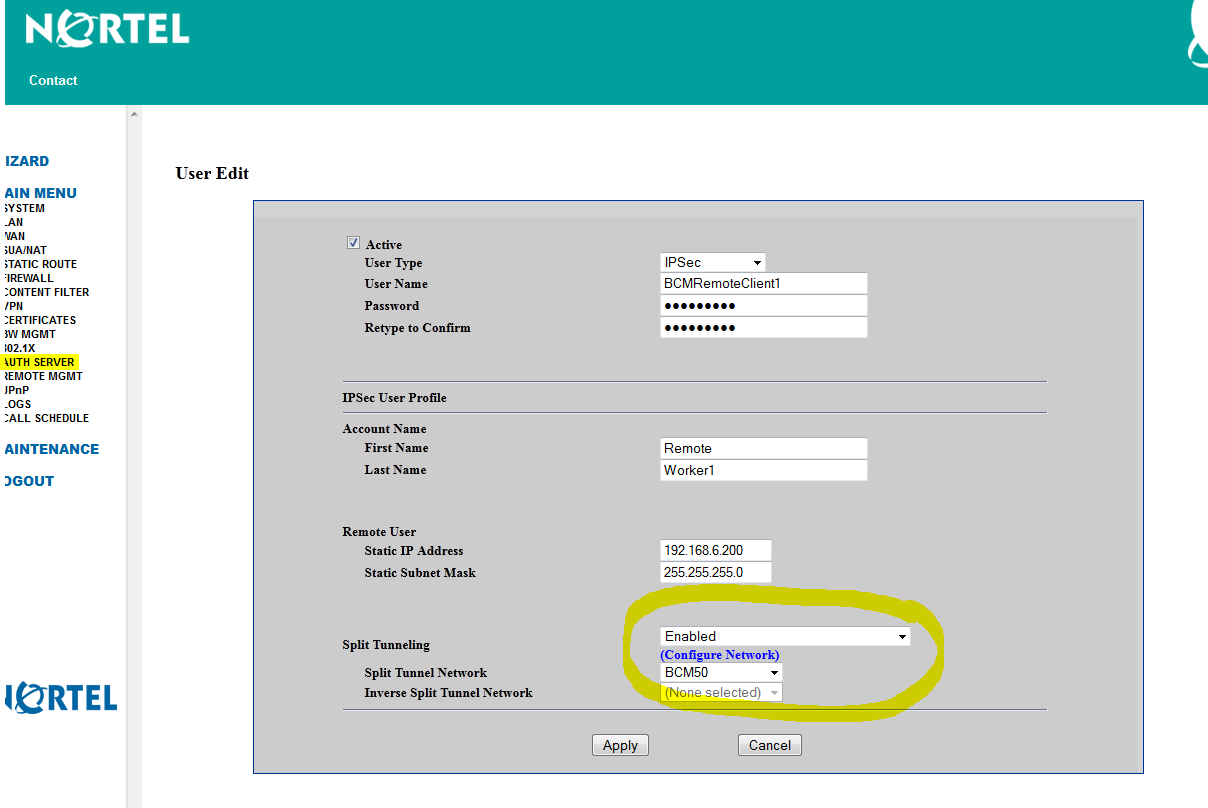
Once inside, I changed one setting at a time, disconnecting after each, to try and discovered the correct place. Eventually (after a lot of trial and error) I discovered the place where the network traffic was channelled. It's under 'AUTH SERVER'. I selected my username (the one that Nortel Contivity VPN connects to) and the changed Enabled Split Tunnelling and selected the BCM50 as the first option (see below).


It worked. I can now connect to my office and use my Softphone, whilst still benefitting from 80mb+ speeds!


Friday, 3 August 2012

Does data come out of my monthly allowance when using Vodaphone Suresignal

Yes, it does.

I made the mistake of using my 3G connection for downloading a number of apps on the Suresignal service thinking "hey it's my broadband connection beeing used for the Suresignal so it's my data allowance". I was wrong.

I found out £75 later in excess data charges!

Wednesday, 22 February 2012

Tory Will Quince calls for action over Colchester dog foul

Following on from my last complaint about the issue of dog foul in Colchester, the local newspaper have reported that Conservative representative Will Quince has called for action about the issue of dog fouling in Colchester.

I have to say it’s great to finally hear someone addressing this issue. It’s an issue my wife and I once raised with local MP Sir Bob Russell but which seemed to fall on deaf ears. No surprise there really, Bob’s busy entertaining Her Majesty of late.

Part of Mr Quinces’ suggestion in the newspaper article is to tackle this problem is to allow local residents to be trained as enforcers. It’s a nice idea, but one I fear would fail in practice. Imagine the scenario – you’re walking down the street dressed as one of these wardens and you see a local scumbag with his ‘status dog’ as it takes a massive crap on the footpath. In typical fashion, the owner just walks away from the pile so you approach him and try to issue a fine. The likelihood is that one of two things could happen – he’ll either throw a load of verbal abuse at you, or, (if you’re really unlucky) mug you and run off. OK, so I’m probably going a bit over the top but you get the point.

Don’t get me wrong – I see why Mr Q is suggesting it (not enough Council staff, costs, blaa blaa) but I just think it could end up with someone getting assaulted. What is good is that he has taken a serious issue and raised the profile of the problem. Nice one Will.

One idea could be to make it an offence to fail to carry a means of cleaning up after your dog. Again, difficult to enforce but it might at least encourage more dog owners to clean up after their dogs. The number of people that we see walking dogs in the local woods without so much of a plastic bag is staggering. I’m sure that many of these people are hard working and friendly people who would never throw litter but for some reason they feel that it’s acceptable to leave a brown germ-fest in the local park.

Another answer could be that the council actually get the current dog warden out and about in these areas that are frequented by dog walkers (radical idea, I know). Something needs to be done though as this problem is gradually turning in to a public health issue.


Tuesday, 18 October 2011

Keep getting nuiscence phonecalls from 01132043110? Then you need to read this.

About a month ago I was looking through some price comparision websites and one of them (a company called Switch Electric & Gas) asked me for a phone number. I'm not stupid and know how some of these companies work so put my Skype number in instead.

Since then, I've been bombarded with missed calls from them. Thankfully I only use thie Skype number or rare occasions so it doesn't really bother me, but I did search the number and found a lot of website with people complaining about be pestered by the company. It seems they use extremely agressive tactics to get you to change suppliers. It was never made clear to me that they were going to add my number to a database and keep calling me. Naughty.

I tried to email them but surprise surprise, the email was rejected. I've called them today and asked them to remove my number from their database. The rude cretin I spoke to assures me that the number as been removed.

Wednesday, 7 July 2010

How to change the number of rings before your phone goes to voicemail

First, you need to know what your voice mail number is. Go to Message > Menu Button > Voicemail Setup and you'll see your voicemail number.

An alternative way to find your voicemail number is to go to Settings > Call Forward > Forward Status > Voice Calls, the "Forward if Unavailable" number is your voice mail number.

Once you know your voicemail number, here's what you do: Go back to the home screen.

Type *61*voicemailnumber**NUM# and hit send.

(Replace "voicemailnumber" with your voicemail number and replace NUM with the number of seconds you wish to wait until forwarding to voicemail. NUM must be 5, 10, 15, 20, 25, or 30.)

So, if my voicemail number is 14045551234 and I want a 20 second delay, I'd do this: *61*14045551234**20# and press SEND.

Synchronising information back from O2 Bluebook to your mobile phone. It can't always be done - or can it?

So here's the problem. You synchronised your O2 mobile phone to Bluebook and all your contacts, message and images are on the website. For whatever reason (e.g. you have been sent a new phone as your old one imploded) you now need to synchronise your contacts and other information BACK to your new phone.

If you have experienced the same is me, you'll know it doesn't work - O2 Bluebook just doesn't work as it should. Yet.

Well do not fear! Here are some instructions on how to set this up so that it works and synchronises for you, manually.

1. Make sure your new phone is WAP enabled. To do this, text "Active" (without the quotation marks) to 2020 on log on to O2's website.

2. Now as all phones are different, find the synchronise option within your phone. You'll probably have to set up a new service - call it "Bluebook".

3. You need to use http://o2contacts.o2.co.uk/syncml for the server address

4. You need to use ./pab for the database address

5. Use GPRS or GSM for the O2 connection

6. Use your username and password which you use to log into the O2 website in the necessary fields

7. Chose what you want to synchronise.

8. Now synchronise. You should find it works a treat.